

Hey Finance Engineers,
If you’ve read this newsletter long enough, you know what I’d advise in every instance: if you can automate the data flow into the spreadsheet, do it. APIs, MCPs, connectors, whatever gets the human out of the cell.
But in practice, there are still many spreadsheets that depend on human input. A sales report where managers enter delivery dates. A budget template department heads fill in. A headcount plan, a project tracker, a contract renewals list, an expense sheet with receipts.
All of this, if not filled in on time, hits your close and your reporting. And we all hate going to Slack and pinging people to fill in their data.
So one of the first things you can build to save your finance team a ton of DM time: custom Slack notifications that read your spreadsheet and tell people what’s missing, days before your close.
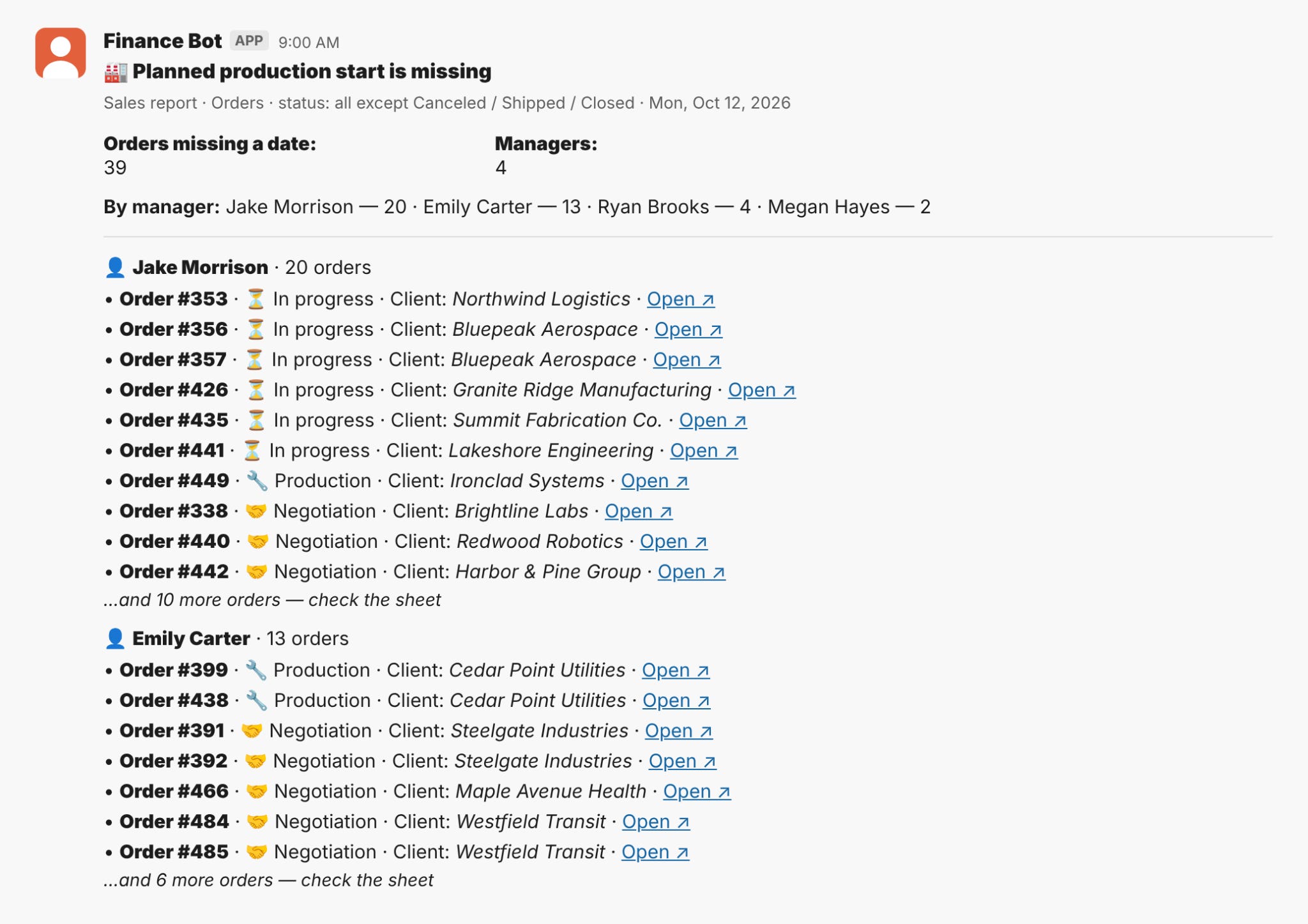
Today I’ll show you how to hook up Slack to your Google Sheet on one of the reports my team automated: a monthly sales report, where four sales managers have to enter a planned production start date for every open order.
Now it takes 0 minutes of finance time a month instead of 3-4 hours every week for back-and-forth.
Build along. Let’s go.
What you need to set up the Slack & GSheets integration
→ The Google Sheet
→ A GitHub account, free is fine
→ Slack admin rights, or an admin who’ll approve a bot
→ Claude Code, open in the repo
→ About 3 hours
Total cost: $0. Google service account, GitHub Actions free plan, Slack bot. All free. The only thing you spend is the afternoon.
How the GSheets <> Slack integration works
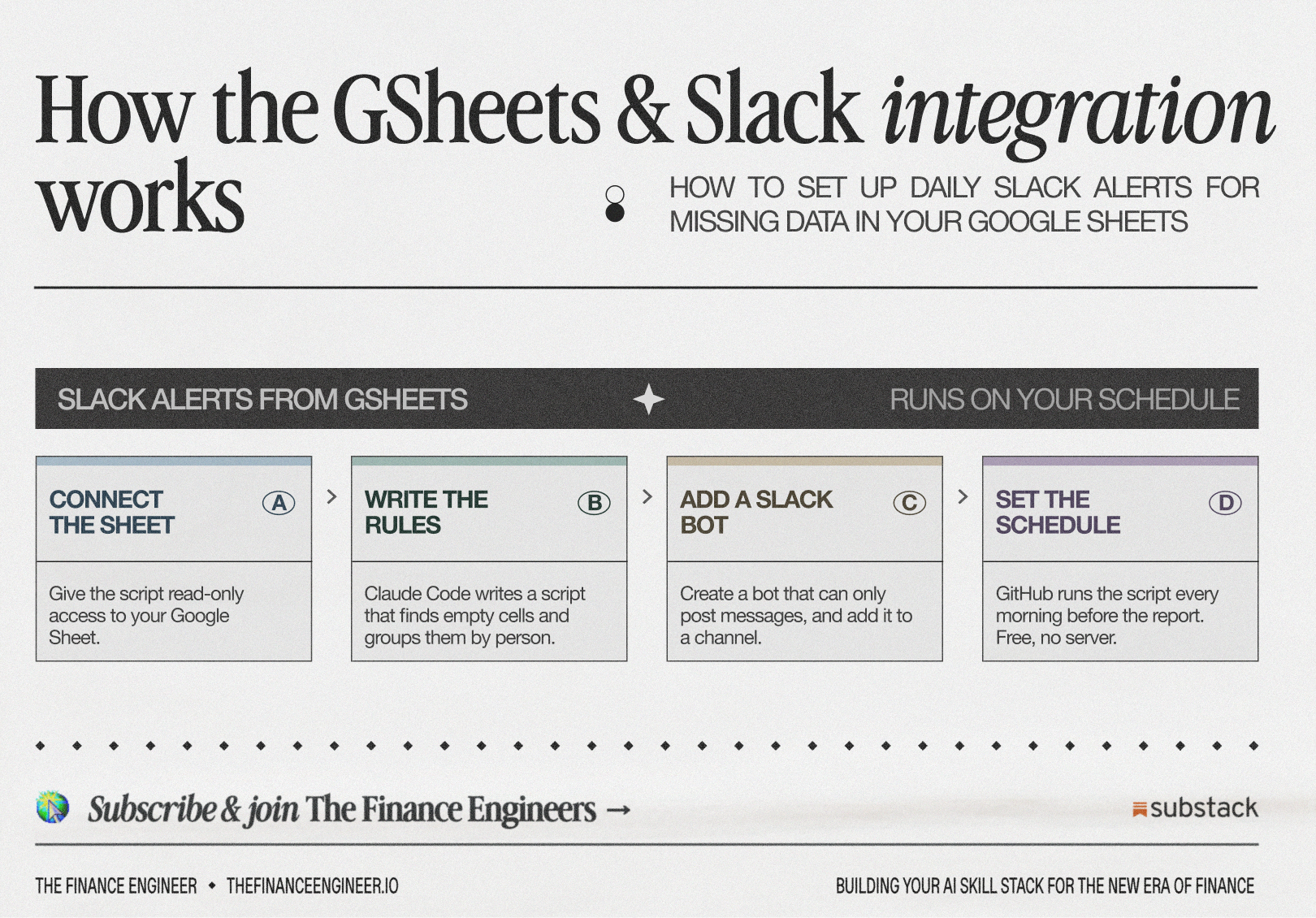
1/ The script (a short program in Python) opens the sheet, checks each row against a few rules, and groups whatever’s missing by manager. We’ll make it below.
2/ GitHub Actions is the alarm clock. GitHub stores code (Google Drive for code, with history; if your team doesn’t have one yet, here’s the setup). GitHub Actions runs that code on a schedule, on GitHub’s computers. You say “every weekday at 9:00,” and it does.
3/ A Slack bot posts the result to the dedicated channel.
There’s no AI in the loop when this runs. I wrote the script with Claude. What runs every morning is a script that gives the same answer every time.
Regular readers know my test: would two people doing this by hand get the same answer? Yes. So it’s deterministic, so it’s code. No need to burn AI tokens.
Now that we have the basics, let’s build the sales report notifications with me. In Slack, it’s gonna look like this:
Step 1. Before you connect Slack, do these 2 things
1/ Let the script read your GSheet. The script needs its own Google login: a service account, a robot user with an email address. You share the sheet with that email, and it can read that sheet and nothing else.
console.cloud.google.com → New project → APIs & Services → Enable Google Sheets API → IAM & Admin → Service Accounts → Create (report-bot) → Keys → Add key → JSON.
The file that downloads is the bot’s password. Keep it out of the repo. Share the sheet with the bot’s email as Viewer.
2/ Have Claude write the script (code). Not a Claude skill. A few plain files in a folder: automations/report-readiness/ in your finance repo, or a new private repo.
Open Claude Code there and paste (customize first):